Requirements met
The recorded vaccinations satisfy the school’s requirements.
Draft the visit note, find a detail in the chart, and see which immunization records need attention. Explore the tools your clinical and administrative teams will use every day.
With consent in place, Oz Scribe records the visit conversation and prepares a draft note in ozehr. Review it beside the transcript, add your assessment and plan, and sign when it is ready.
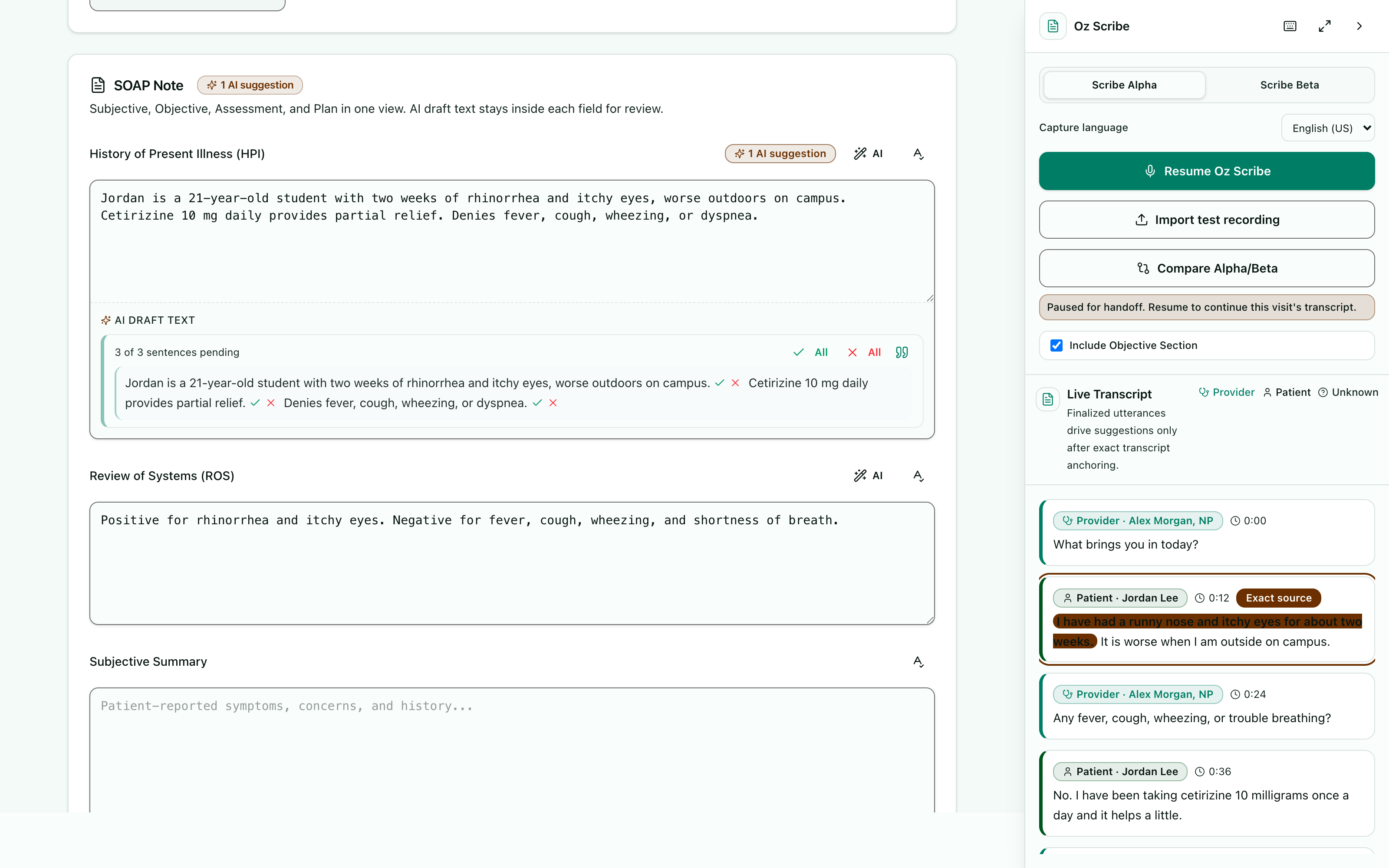
In ozehr, the EHR built for college health, Oz Scribe listens with the student’s consent, so you don’t have to type. One tap to start. It follows the conversation, speaker by speaker. Pause for the nurse-to-provider handoff, and pick it back up in the same note. The draft uses the wording and structure learned from your own signed notes. Select any draft text to open the exact transcript passage behind it. Accept, edit, or reject. Nothing is final until you review and sign. And with OzOnCall, you can use Oz Scribe and review drafts on your phone. Oz Scribe is included in ozehr. More eye contact, less time charting. Book a demo at ozehr.com.
Illustrative scenes and product views with sample data. Clinical information requires review by the care team.
“What happened at the last visit?” “Which medications are listed?” Ask Oz helps you find information in the student’s record. Read the answer and open its linked sources before relying on it.
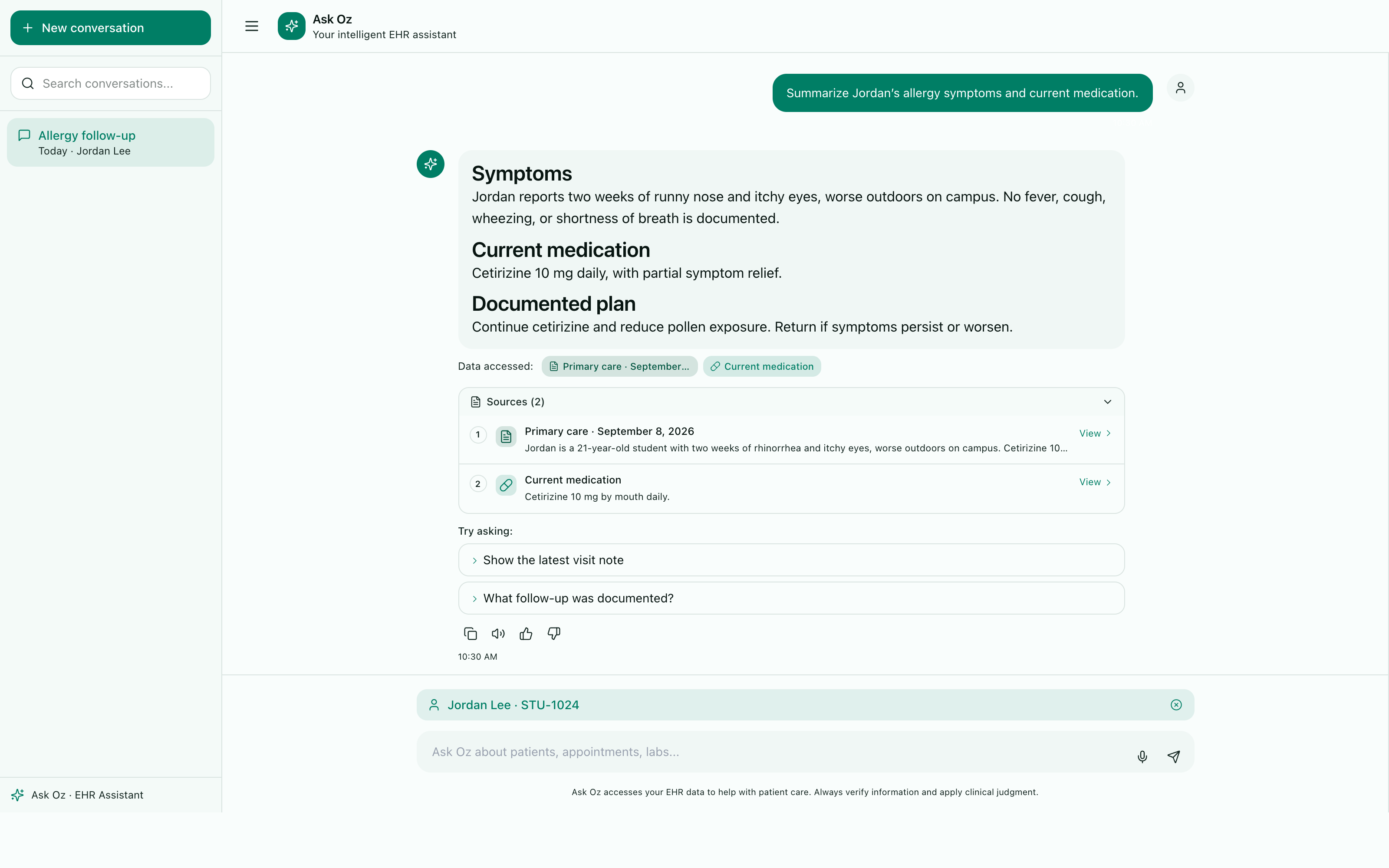
Between visits, there’s never time to read the whole chart. So ask. Ask Oz is built into ozehr, the EHR for college health. Ask about visit history, medications, or follow-up. You get an answer, linked to the chart records behind it. Open the source, and check it for yourself. Start with a summary of the latest four signed visits, and what still needs attention. Normal chart access applies, and counseling records stay behind sensitive-record controls. Ask Oz is included in ozehr. See it with your care team. Book a demo at ozehr.com.
Illustrative scenes and product views with sample data. Clinical information requires review by the care team.
A student uploads the record they have. ozehr extracts vaccine names and dates, checks your school’s requirements, and shows which are met and what still needs attention.
Open the immunization workflow film
The student uploads a photo or document.
Vaccines and dates are extracted automatically.
Records are checked against your requirements.
Students see their status and what’s needed.
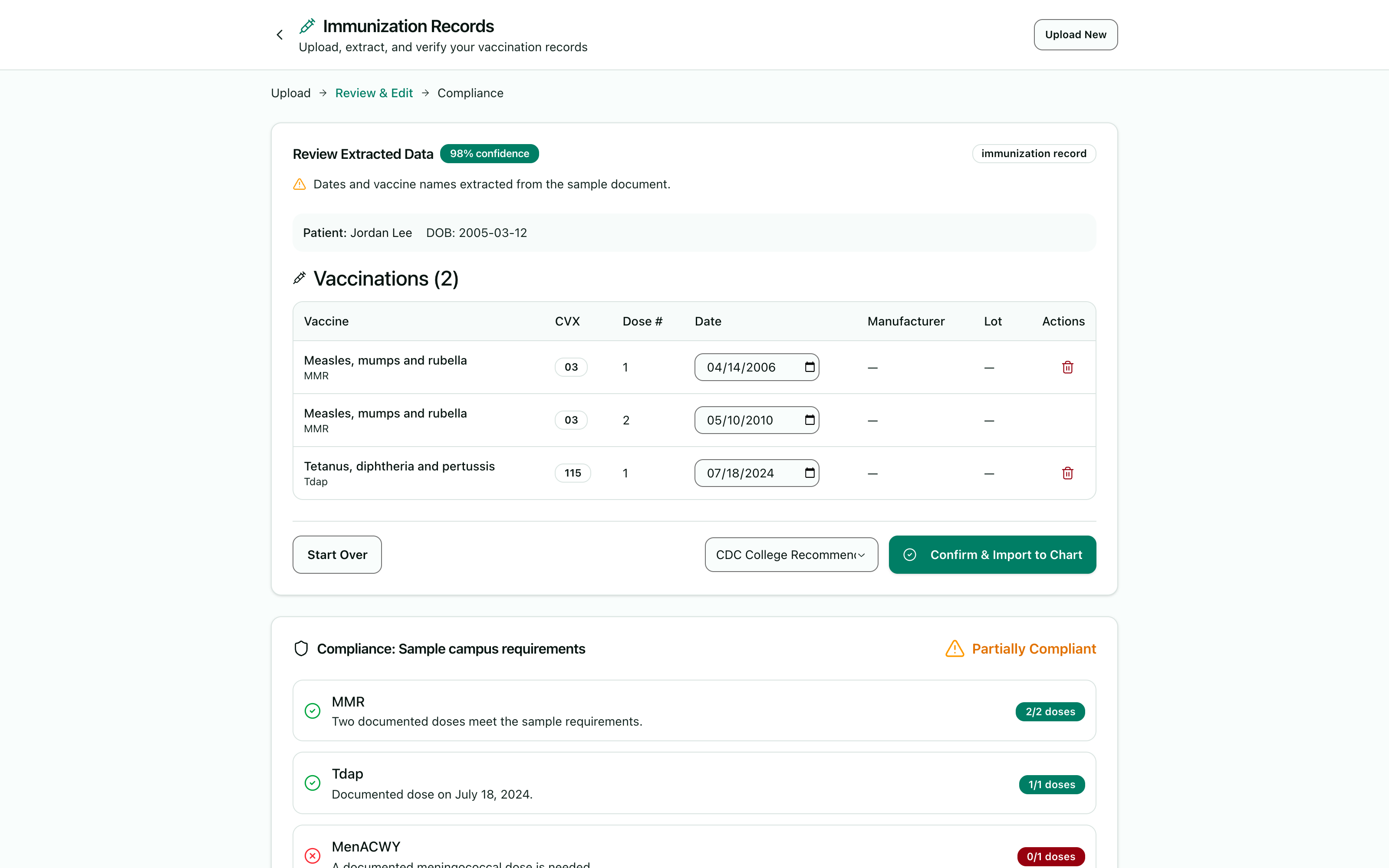
Every start of term, the vaccine records pile up. With ozehr, the EHR built for college health, students just take a photo of their record. Or upload a record from a laptop. ozehr reads the vaccine names and dates for you. Every extracted dose is laid out, ready to review. Then it checks the record against your school’s configured requirements. Compliant. Action needed. Staff review. There’s a clear next step, every time. Unclear handwriting goes to your staff for review. And students see where they stand, right in the OzEHR app. Less paperwork. Clearer compliance. Book a demo at ozehr.com.
Illustrative scenes and product views with sample data. Clinical information requires review by the care team.
The recorded vaccinations satisfy the school’s requirements.
A required dose or document is missing. The student can see what is needed.
A date is unclear, or a titer or exemption needs review before a decision.
Clear, eligible records can be applied automatically. Nurses and records staff review unclear dates, missing details, titers, and exemptions. Students see a status and the next step for their record.
Students can arrange care, complete forms, and follow up from their phones. OzEHR gives them a place to find appointments, health records, and messages from the care team.
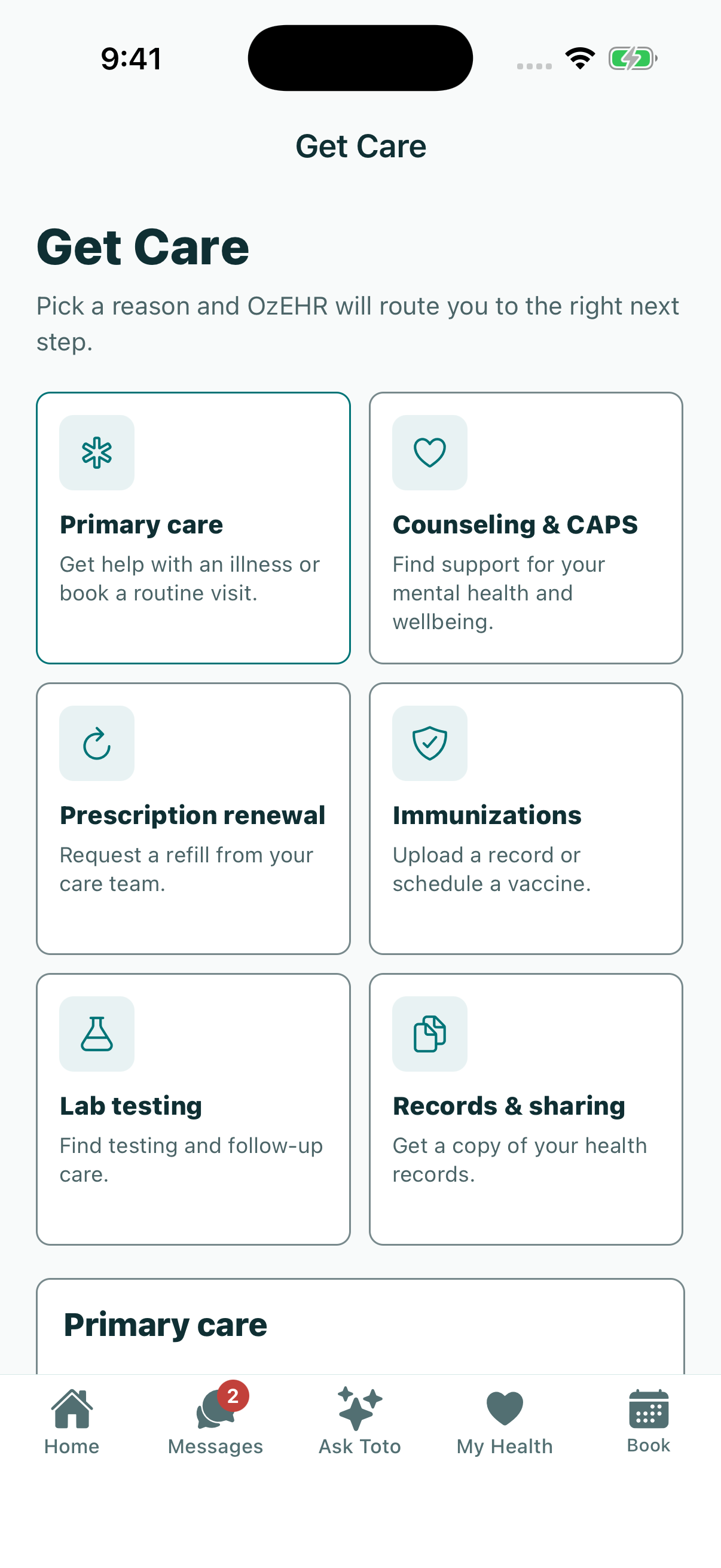
With ozehr, students get their health center in their pocket: the OzEHR app. They choose the care they need, from primary care to counseling. Book appointments, and complete intake forms, right from their phone. Not sure what they need? They can ask Toto. Request a prescription renewal in a few taps. Message the care team, securely. And find results, medications, and records, all in one place. Campus care, close at hand. Book a demo at ozehr.com.
Illustrative scenes and product views with sample data. Clinical information requires review by the care team.
OzOnCall is the provider app. Open a student’s chart, review a draft note, or check a lab result when you are away from your desk.
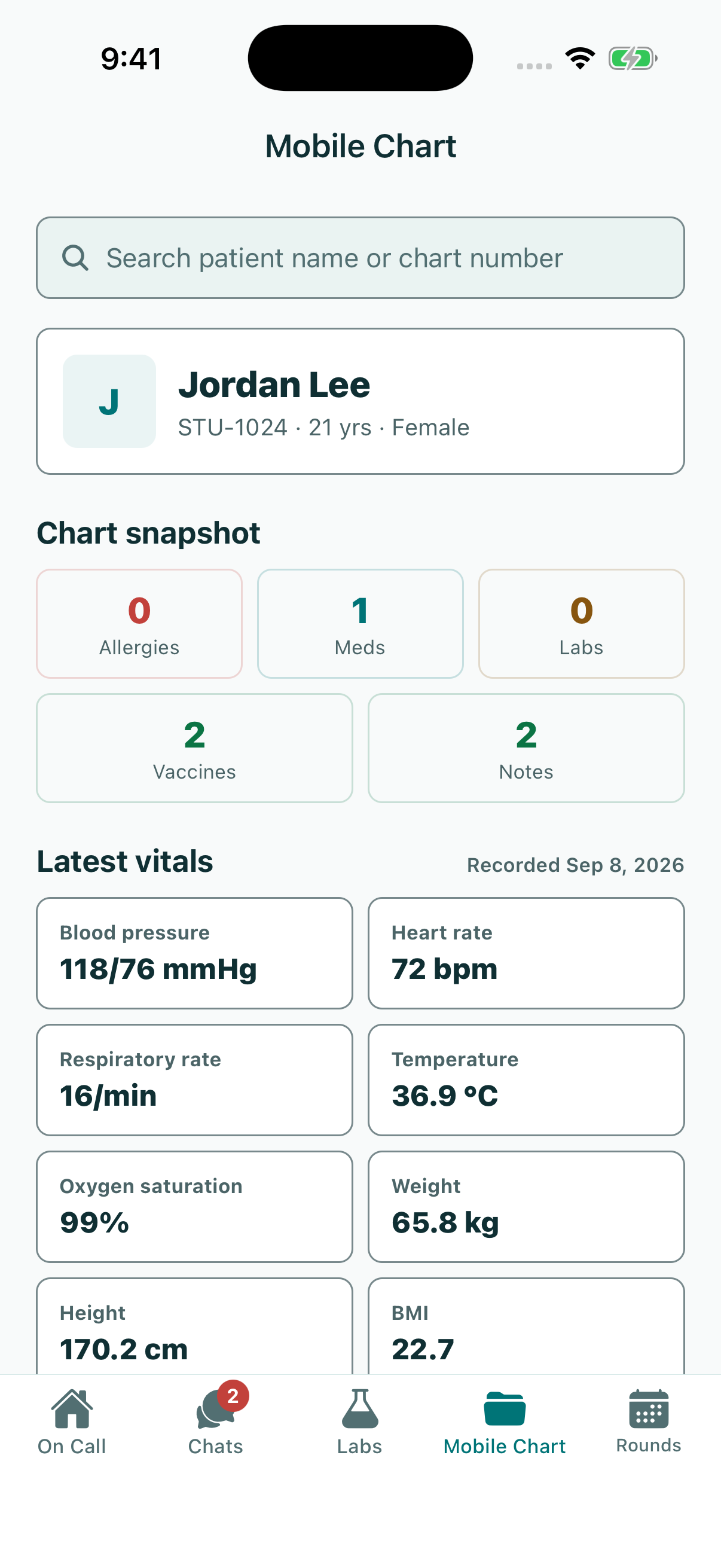
Silent video. Product views use sample data.
The chart goes with you. OzOnCall · the provider app.
Review the note on your phone. Use Oz Scribe and review draft notes in OzOnCall.
Check messages and lab results. Review secure chats and lab results.
Care beyond one workstation. See OzOnCall in your ozehr demo.
Use the web EHR on your exam-room workstation, iPad, or Windows or Mac laptop. When you move to your phone, OzOnCall gives you access to charts, draft notes, messages, and results.
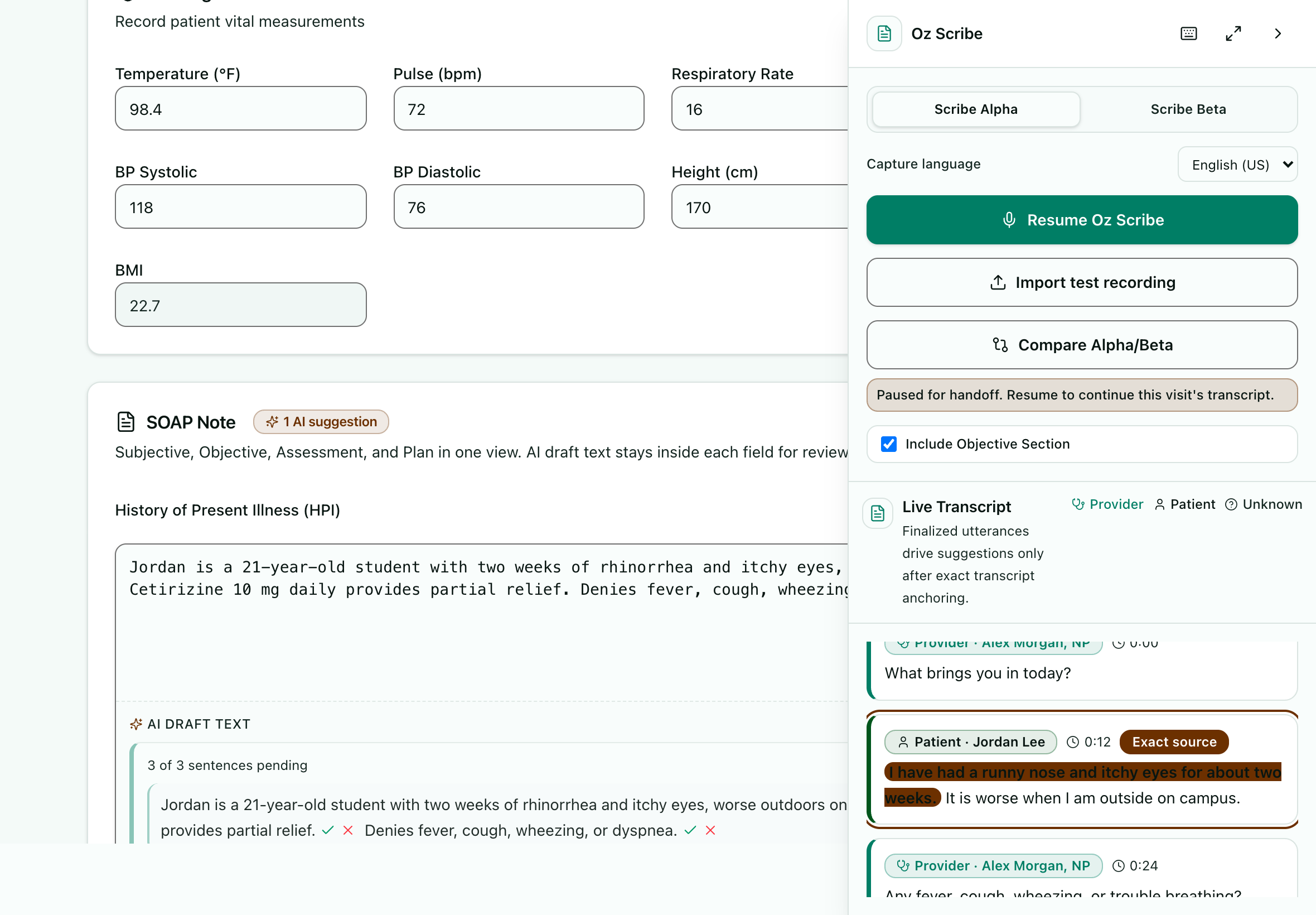
Silent video. Product views use sample data.
Your chart, wherever you’re working. Sign in to return to your charts and notes.
Workstation to iPad. Use the web EHR where you provide care.
Keep the chart close on mobile. Open charts, review draft notes, and check results in OzOnCall.
See ozehr on the devices you use. Book a 30-minute ozehr demo.
Oz Scribe, Ask Oz, automatic vaccine-record reading, and both mobile apps are included. So are implementation, training, support, and updates.
See rates and what’s includedChoose a charting task, a records-review question, or a student visit. We’ll show the steps your team would take in ozehr.